Microsoft Global Secure Access: Complete 2026 Guide to Entra's Zero Trust VPN Replacement

Microsoft Global Secure Access is reshaping how organisations approach network security. If you have been watching Microsoft’s security strategy over the past year, it is clear they are making a decisive shift away from traditional network perimeters. Global Secure Access is Microsoft’s answer to a question most organisations have already reached: why are we still relying on VPNs in aZero Trust world?
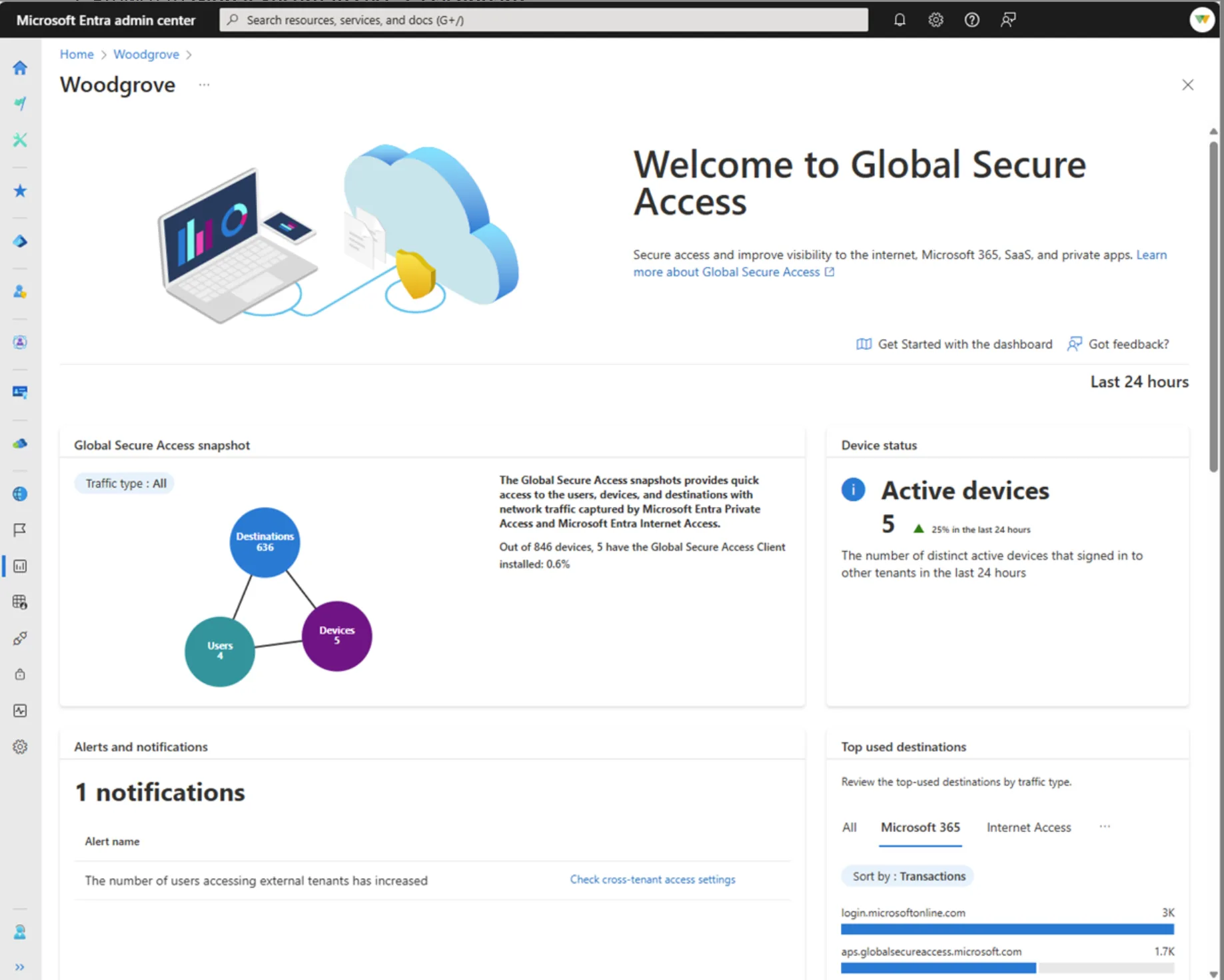
Global Secure Access Dashboard
If you’ve been keeping an eye on Microsoft’s security strategy lately, you’ve probably noticed they’re pushing hard into network security. Global Secure Access is their answer to the question nobody’s really asking anymore: “Why do we still need a VPN in 2026?”
What Is Microsoft Global Secure Access?
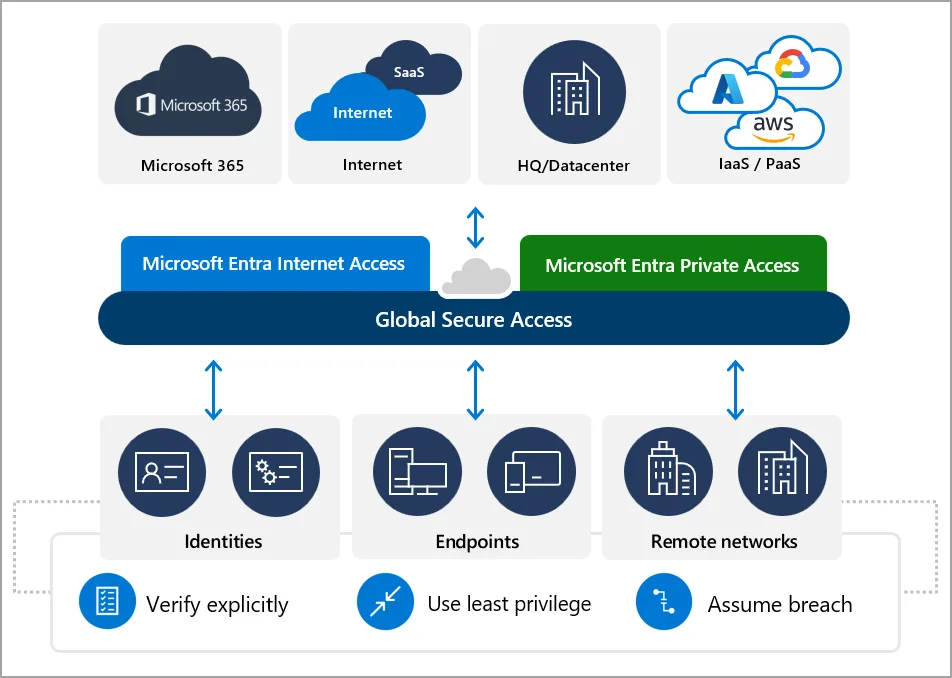
Global Secure Access Architecture
Microsoft Global Secure Access (GSA) represents Microsoft’s unified Security Service Edge (SSE) solution, built natively into the Microsoft Entra identity platform. It provides identity-centric network security that converges traditional network security tools—like secure web gateways and VPNs—with modern Zero Trust identity controls.
Unlike legacy security solutions that treat identity and network as separate domains, GSA embeds network access controls directly into the identity fabric of your organisation. This integration means every network access decision can leverage the full context of who the user is, what device they’re using, their risk profile, and real-time session conditions.
The solution addresses a fundamental shift in how organisations must approach security: with hybrid work now permanent, the traditional network perimeter has dissolved. Users access resources from home networks, coffee shops, and airports—not just the corporate office. Global Secure Access treats every access request as potentially hostile, verifying identity and context before granting access to any resource, anywhere.
- Identity-First Design – Network security woven into Entra ID from the ground up
- Zero Trust Native – Every request verified, least-privilege access enforced
- Unified Policy – One Conditional Access engine for identity and network
- Global Edge Network – Low-latency access from anywhere via Microsoft’s infrastructure
Current General Availability Status
As of March 2026, Global Secure Access has achieved full General Availability (GA) across its core components. This represents a significant milestone in Microsoft’s SSE strategy, moving from preview to production-ready enterprise deployment.
Microsoft Entra Internet Access
Microsoft Entra Internet Access became generally available on July 11, 2024, marking Microsoft’s entry into the identity-centric secure web gateway market. This service secures access to all internet and SaaS applications through an identity-aware secure web gateway.
Core Capabilities (GA):
- Identity-Centric SWG – Replaces traditional secure web gateways with a solution that understands user identity and device context from Microsoft Entra ID
- Universal Conditional Access – Extends Conditional Access policies to any internet destination, even non-federated SaaS applications
- Web Content Filtering – Category-based filtering with pre-populated web categories, plus FQDN-level controls
- Compliant Network Check – Prevents token replay attacks by ensuring users cannot bypass the SSE security stack
- Universal Tenant Restrictions (TRv2) – Controls data exfiltration by managing which external tenants and applications users can access
- Source IP Preservation – Maintains original user source IP in logs and Conditional Access evaluations
- Threat Intelligence Filtering – Prevents access to known malicious internet destinations through integrated threat feeds
The service operates through Microsoft’s global edge network, with multiple points of presence ensuring low-latency access regardless of user location. Traffic to Microsoft 365 and Azure services routes directly through Microsoft’s WAN infrastructure, avoiding performance penalties from additional hops.
Microsoft Entra Private Access
Microsoft Entra Private Access achieved General Availability on November 1, 2024, providing Zero Trust network access to private applications and resources without requiring traditional VPN infrastructure.
Core Capabilities (GA):
- VPN Replacement – Eliminates the need for traditional VPN clients and infrastructure for accessing private corporate resources
- Application-Level Access – Replaces network-level VPN access with granular, per-application access controls based on identity and context
- Private Network Connectors – Lightweight agents deployed on Windows Server 2016 or later that establish outbound connections from your network to Global Secure Access
- Kerberos and NTLM Support – Maintains compatibility with legacy authentication protocols while adding modern Zero Trust controls
- DNS-Based Access – Uses DNS resolution to route traffic through the Global Secure Access client without requiring application reconfiguration
Private Access fundamentally changes how organisations approach remote access. Instead of connecting users to the corporate network (and all its resources), users connect only to specific applications they’re authorised to access. This least-privilege approach dramatically reduces lateral movement opportunities for attackers.
Microsoft Entra Suite
The Microsoft Entra Suite became generally available on July 11, 2024, bundling together the complete identity and network access security stack:
- Microsoft Entra Internet Access
- Microsoft Entra Private Access
- Microsoft Entra ID Governance
- Microsoft Entra Permissions Management
- Microsoft Entra Verified ID
This suite represents Microsoft’s comprehensive Zero Trust access solution, combining identity governance, network security, and cloud infrastructure entitlement management into a single licensing option.
Global Secure Access: Recent Launches and Updates
Here’s what’s changed in the last six months:
Microsoft 365 E7 and Entra Suite Integration
On March 9, 2026, Microsoft announced Microsoft 365 E7, the first new enterprise licensing tier since E5 launched in 2015. This represents a significant development for Global Secure Access adoption because E7 is the first Microsoft 365 plan to include the complete Entra Suite.
Key Details:
- Availability Date – May 1, 2026 (GA)
- Included Components – Microsoft 365 E5 + Microsoft 365 Copilot + Entra Suite + Agent 365
For organisations on E3 or E5 plans, Entra Suite (and therefore Global Secure Access) required separate licensing. With E7, these capabilities are now bundled, potentially accelerating adoption for organisations already planning Copilot deployments.
Important Context:
- E3 and E5 pricing increases take effect July 1, 2026
- E7 represents a bundled discount compared to purchasing components separately
- Organisations on E5 planning to add Copilot and Entra Suite individually should evaluate E7 for cost savings
🔧 Continuous Feature Enhancements
While the core services achieved GA in 2024, Microsoft has continued enhancing Global Secure Access with regular updates:
Dashboard and Monitoring Improvements:
- Alerts and Notifications Widget – Real-time visibility into unhealthy remote networks, increased external tenant activity, token inconsistencies, and blocked web content
- Usage Profiling – Historical analysis of transactions, users, devices, and bandwidth consumption over selectable time periods
- Cross-Tenant Access Monitoring – Visibility into users accessing other Microsoft Entra tenants, with controls for tenant restrictions
- Device Status Tracking – Active and inactive device counts with percentage change indicators
- Generative AI Application Monitoring – Specific tracking of AI tool usage (added to cloud applications widget)
Private Access Enhancements:
- Marketplace Deployment – Private Network Connectors now available on Azure Marketplace, AWS Marketplace, and GCP Marketplace (in preview)
- Maintenance Connector Groups – Support for dedicated maintenance groups to gracefully drain connections before server maintenance
- Connector Version Requirements – Minimum version 1.5.3417.0 for Private Access support, with automatic updates via the connector updater service
Platform Expansion:
- Global Secure Access Client – Available for Windows and Android; macOS and iOS clients announced as “coming soon”
- SD-WAN Integration – Official partnerships with HPE Aruba and Versa for integrated SSE and SD-WAN deployments
Practical Implementation Guidance
Deployment Architecture
Global Secure Access uses a distributed architecture that places security enforcement close to users while maintaining centralised policy management:
For Internet Access:
- Client-Based – Global Secure Access client installed on endpoints tunnels internet traffic to Microsoft’s SSE edge
- Branch Connectivity – Site-to-site VPN from branch firewalls/routers to Microsoft’s SSE edge (available for Microsoft 365 traffic now, Internet Access traffic coming soon)
- Hybrid – Combine both approaches for comprehensive coverage
For Private Access:
- Connector Deployment – Install private network connectors on Windows Servers with access to internal resources
- Connector Groups – Organise connectors into groups for high availability and geographic optimisation
- Application Registration – Define private applications in Entra ID, assigning them to appropriate connector groups
- Conditional Access – Apply identity-based policies to private application access
Configuration Steps
Phase 1: Prerequisites
- License – Microsoft Entra ID P1 license minimum (P2 recommended for full Conditional Access capabilities)
- Roles – Global Secure Access Administrator role assignments
- Server Requirements – For Private Access: Windows Server 2016+ with .NET Framework 4.7.2+ for connector installation
Phase 2: Traffic Forwarding Profiles
Global Secure Access uses traffic forwarding profiles to determine which traffic routes through the service:
- Microsoft Traffic Profile – Captures Microsoft 365 and Entra ID traffic; available now
- Internet Access Traffic Profile – Captures all internet/SaaS traffic; available now
- Private Access Traffic Profile – Captures traffic to registered private applications; available now
Profiles are user-aware and can be targeted to specific groups, enabling phased rollouts.
Phase 3: Conditional Access Integration
The power of Global Secure Access emerges when combined with Conditional Access:
- Create Conditional Access policies targeting “Global Secure Access” as the application
- Leverage user risk, device compliance, and location signals
- Apply Compliant Network checks to prevent token replay
- Configure session controls for continuous evaluation
Phase 4: Monitoring and Optimisation
Use the Global Secure Access dashboard to:
- Monitor active devices and user adoption
- Review top destinations and traffic patterns
- Identify cross-tenant access activity
- Analyse web category filtering effectiveness
- Troubleshoot connector health
Common Deployment Patterns
VPN Replacement Strategy:
Organisations typically replace VPNs in phases:
- Pilot – Deploy Private Access for a small set of non-critical applications
- Expand – Migrate department by department, retiring VPN profiles as coverage completes
- Optimise – Tune Conditional Access policies based on observed usage patterns
- Retire – Decommission VPN infrastructure once Private Access covers all use cases
SSE Consolidation:
Organisations already using third-party SSE solutions can adopt Global Secure Access incrementally:
- Enable Microsoft Traffic profile first to optimise Microsoft 365 performance
- Add Internet Access for specific user groups or applications
- Gradually migrate from third-party SWG based on contract renewals
Hybrid Workforce:
- Remote Workers – Global Secure Access client on all corporate devices
- Office Workers – Branch connectivity for network-level protection
- Contractors/Partners – Conditional Access policies with time-limited access
Licensing Requirements
Current Licensing Options
Standalone Entra Suite:
- Includes – Internet Access + Private Access + ID Governance + Permissions Management + Verified ID
- Minimum Requirement – Microsoft Entra ID P1 (included in M365 E3, E5, and Business Premium)
Microsoft 365 E7 (Available May 1, 2026):
- Includes – M365 E5 + Entra Suite + Microsoft 365 Copilot + Agent 365
- Significance – First M365 plan to include Entra Suite by default
License Comparison
| Plan | Internet Access for Microsoft Solutions | Private Access | Internet Access |
|---|---|---|---|
| M365 E3 | Included | Add-on | Add-on |
| M365 E5 | Included | Add-on | Add-on |
| M365 E7 (May 2026) | Included | Included | Included |
Important Licensing Notes
- P1 vs. P2 – While Global Secure Access technically requires only P1, many advanced Conditional Access features (like Identity Protection integration and risk-based policies) require P2
- Entra Suite vs. Individual Components – Internet Access and Private Access can be licensed individually in some scenarios, but Entra Suite provides the most complete solution
- Trial Availability – Microsoft offers trial licenses for evaluation
Key Differentiators
Identity-First Architecture
Unlike traditional SSE solutions that bolt identity onto network security, Global Secure Access was built with identity as the foundation. This means:
- No separate user directories to maintain
- Conditional Access extends naturally to network traffic
- User and device context travels with every connection
- Single policy engine for identity and network controls
Microsoft 365 Integration
For organisations heavily invested in Microsoft 365, Global Secure Access offers unique advantages:
- Direct WAN Integration – Microsoft 365 traffic routes directly into Microsoft’s global network without extra hops
- Entra ID Native – No federation or additional identity providers required
- Unified Logging – All access events in Microsoft Entra sign-in logs
- Copilot Ready – Compliant with Microsoft 365 Copilot data handling requirements
Zero Trust by Default
Global Secure Access implements Zero Trust principles without requiring complex configuration:
- Verify Explicitly – Every access request authenticated and authorised
- Use Least Privilege – Per-application access, not network access
- Assume Breach – Continuous evaluation with Compliant Network checks
Final Thoughts
Global Secure Access isn’t just a VPN replacement — it’s a fundamental rethink of how access should work when identity is the new control plane. The real power comes from how naturally it integrates with Conditional Access, device compliance, and risk signals that many organisations are already using.
Like any security platform, success depends on planning. Start small, understand your traffic flows, and design policies intentionally. Organisations that treat GSA as an architectural shift rather than a like‑for‑like VPN swap will see the biggest gains.
If you’ve already standardised on Microsoft Entra and Microsoft 365, Global Secure Access fits extremely well — and in many cases, removes more complexity than it adds.