Microsoft Cloud PKI: Replace On-Prem CAs with Intune
Let’s be honest, traditional public key infrastructure has always been one of those things organisations put up with rather than actually enjoy. You end up with offline root CAs, issuing servers, Network Device Enrolment Service (NDES), reverse proxies, the Intune Certificate Connector, and a pile of documentation that only two people in the company understand. When those people leave, the next certificate renewal becomes a small crisis.
Microsoft Cloud PKI is the company’s attempt to remove most of that stack for devices already managed by Intune. It is a cloud-hosted certificate authority service that issues, renews and revokes certificates without requiring any on-premises servers or connectors. For many environments that have already moved to Entra join or hybrid join, this is a meaningful simplification.
Related: Global Secure Access: Microsoft SSE Solution
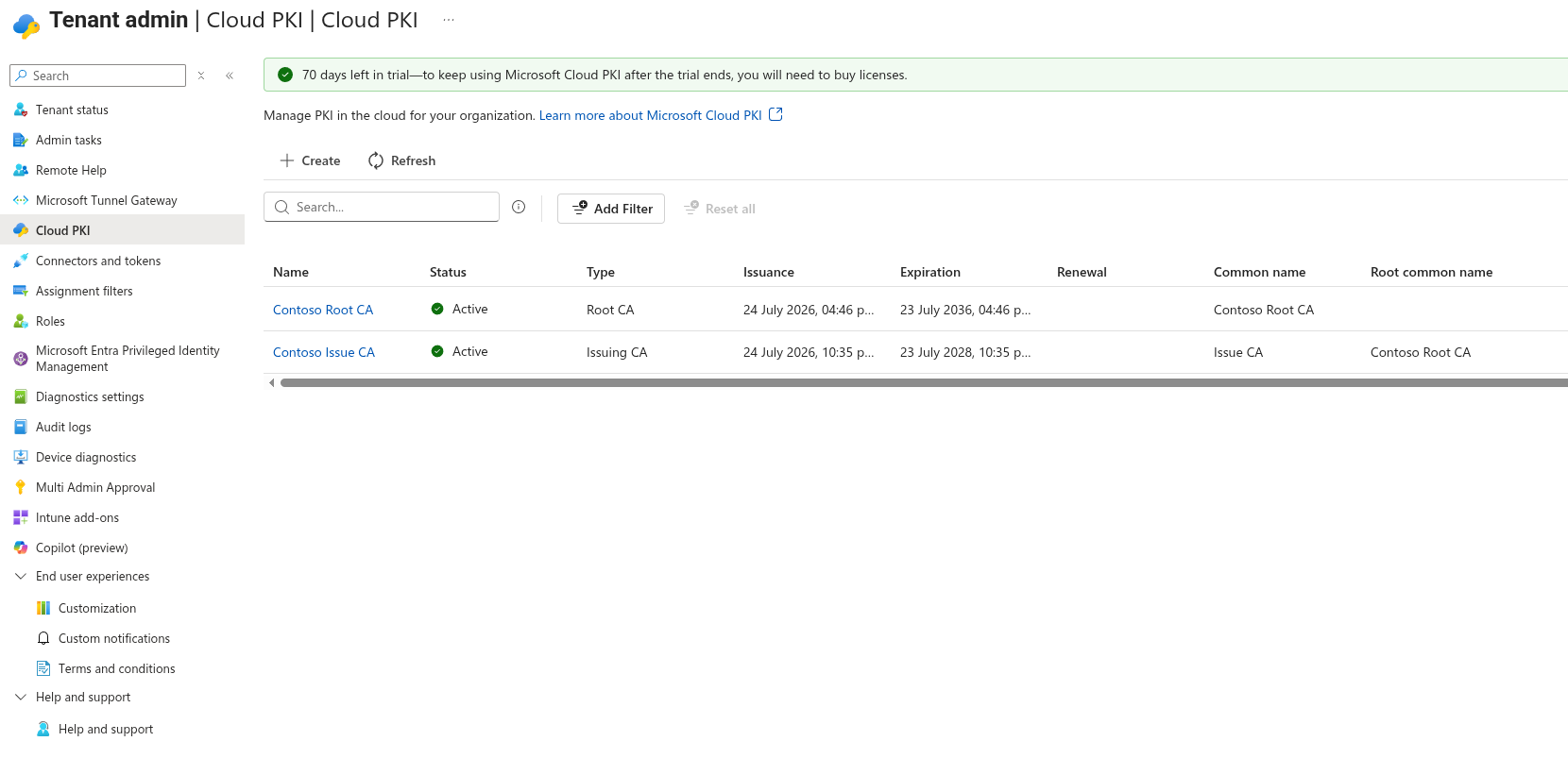
Microsoft Cloud PKI Dashboard
What Cloud PKI Actually Is
Cloud PKI lives inside the Microsoft Intune admin centre under Tenant administration. You create a two-tier hierarchy: a root CA and one or more issuing CAs. Both can live entirely in Microsoft’s cloud, unless you bring your own CA (BYOCA). The issuing CA then services SCEP requests from enrolled devices automatically.
Supported platforms are the ones you would expect:
- Windows
- iOS / iPadOS
- macOS
- Android
Devices must be enrolled in Intune and able to receive a SCEP certificate profile. Once the profiles are assigned, certificate lifecycle management (issuance, renewal and revocation) is handled by the service.
There are two main deployment models:
| Model | Description | Best suited for |
|---|---|---|
| Cloud PKI root + issuing CA | Fully cloud-hosted two-tier hierarchy | Organisations that want to leave on-prem PKI behind for Intune devices |
| Bring Your Own CA (BYOCA) | Cloud issuing CA anchored to an existing private root (ADCS or third-party) | Organisations that must keep their existing root of trust |
You can run both models in the same tenant if needed.
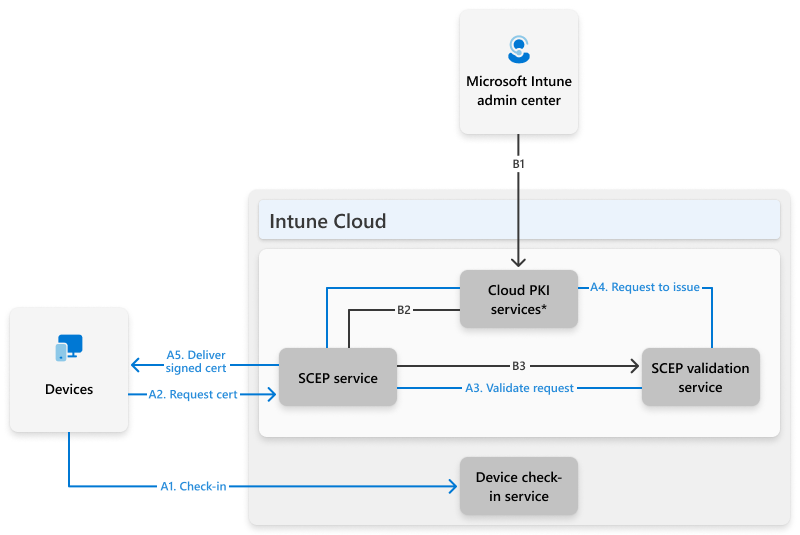
Microsoft Cloud PKI Architecture
Why This Matters in Practice
The biggest practical win is the removal of the Intune Certificate Connector and NDES. Those components have always been a source of operational friction. Certificate issues that only appear on certain networks, connector health alerts, and the general nervousness that comes with maintaining a public-facing enrolment service.
With Cloud PKI the registration authority is built into the service. Devices request certificates through the normal Intune SCEP profile flow. No extra infrastructure sits between the device and the CA.
I have seen organisations spend months designing highly available NDES farms only to discover that certificate renewal still fails for a subset of remote devices. Cloud PKI does not magically solve every certificate problem, but it does eliminate a large class of infrastructure-related failures.
Getting Started – High Level
The process is short, although requires careful planning:
- Confirm licensing (Cloud PKI is included with Microsoft 365 E5 from July 2026 in many tenants, or available via Intune Suite / standalone add-on — see also the broader Microsoft 365 E7 bundle if you are consolidating licences).
See also: Microsoft 365 E7 Licensing Guide
- Create a root CA in the Intune admin centre.
- Create an issuing CA under that root.
- Deploy the Cloud PKI trust chain to devices (trusted certificate profile).
- Create and assign SCEP certificate profiles that point at the new issuing CA.
Microsoft documents the exact clicks. The important point for most teams is that the heavy design work (key length, validity periods, EKUs, renewal thresholds) still needs thought. Cloud PKI does not remove the need to decide what the certificates are actually used for — Wi-Fi, VPN, client authentication, etc. It just removes the servers that used to issue them.
Current Limitations Worth Knowing
A few practical constraints remain:
- Maximum of three CAs per tenant (root, issuing and BYOCA all count toward the limit).
- The certificate list view in the admin centre currently shows only the first 1,000 certificates per CA.
- No customer-controlled data residency option at the time of writing.
- Trial CAs use software-backed keys that cannot later be converted to hardware security module (HSM) keys.
These are not deal-breakers for most mid-sized organisations, but they matter if you are planning a large multi-tenant or highly regulated deployment.
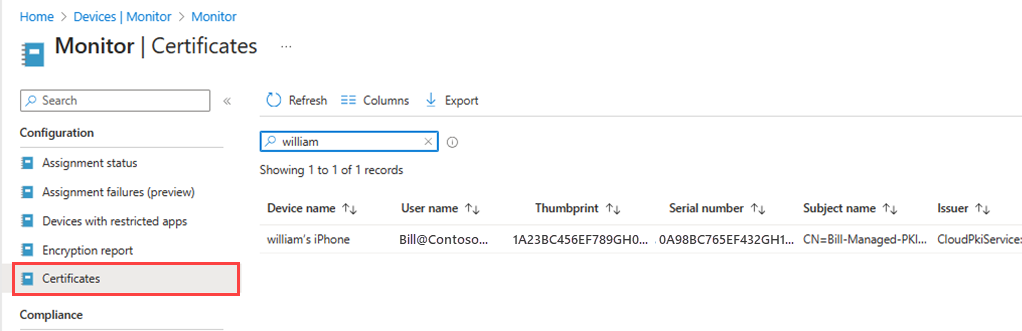
Microsoft Cloud PKI Monitoring
Where It Fits in the Bigger Picture
Cloud PKI is not a replacement for every certificate use case. Public-facing websites, code signing, and certain internal services will still need traditional or public CAs. What it does well is the high-volume, device-centric certificate work that Intune already manages. Wi-Fi, VPN, and client authentication on managed endpoints. For organisations looking to modernise remote access beyond traditional VPNs, Microsoft Global Secure Access provides an identity-centric Security Service Edge (SSE) alternative that integrates with the same Entra ID foundation.
For organisations that have already committed to Intune as their primary device management platform, the reduction in moving parts is real. Fewer servers to patch, fewer certificates of the infrastructure itself to renew, and fewer late-night calls when the connector stops talking to NDES.
What You Should Do Next
If you are still running on-premises certificate infrastructure purely to support Intune-managed devices, it is worth evaluating Cloud PKI against your current operational cost. The feature is now mature enough for production use in most environments, and the licensing changes in 2026 have made it more accessible for E5 customers.
Start with a single issuing CA and a pilot group of devices. Confirm that the certificates appear where you expect them (Wi-Fi profiles, VPN clients, etc.) and that renewal works cleanly. Once that is solid, the rest of the migration is mostly documentation and decommissioning the old NDES servers.
Have you already looked at Cloud PKI in your tenant, or are you still maintaining the traditional stack? The practical differences only become obvious once you try both side by side.
Separately, if you want a lighter read on how I run my own workstation these days, I wrote about switching from Fedora to Arch Linux.
About the author:Zanes background in Microsoft 365 and security architecture